
Your Health. Your Journey. Your “It”.

Live4It Offerings

Health and Wellness Platform

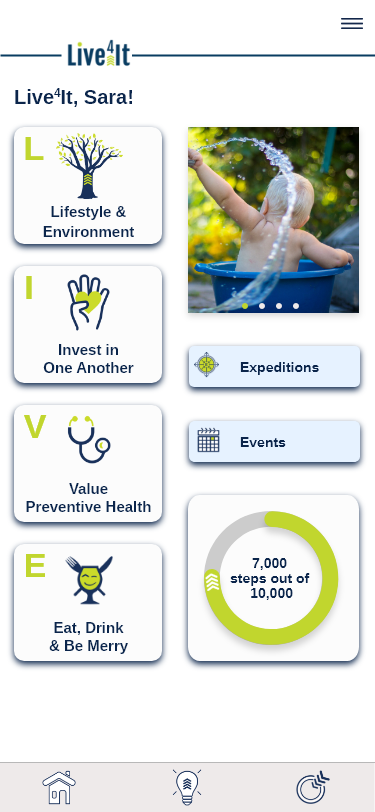
Live4It is designed to help individuals identify and pursue what is important to them – their “It” – to achieve a longer, healthier, and happier life. The pursuit of their “It” is powerful, but for many, they want a set of navigational tools. Therefore, we offer two platforms, an App and Portal, to connect them with like-minded individuals, encourage mindfulness and positive habits, provide access to valuable health and wellness information, and allow them to earn incentives*. The platforms are built on the framework, foundation, and structure of Live4It’s Pathways:

  • Lifestyle & Environment
  • Invest In One Another
  • Value Preventive Health
  • Eat, Drink & Be Merry​

To facilitate user engagement, Live4It offers a mobile app and web portal where individuals can participate in “Expeditions”—programs with specific start and end dates designed to motivate users toward healthier lifestyles. Participants can earn points by engaging in various activities, such as physical exercises, meditations, and preventive health measures. These points can lead to rewards, depending on the specific Expedition’s structure.

The platform supports integration with various health data sources and wearable devices, including Fitbit, Garmin, Google Fit, and Apple devices, allowing users to sync their health data seamlessly. Additionally, Live4It provides resources like social events, outreach opportunities, and mental health tools to assist users in making incremental changes at their own pace.


Live4It is a collaborative initiative involving health care entities, local employers, and community organizations, aiming to create a unified approach to health and wellness under one goal and one message: “Your Health. Your Journey. Your ‘It’.”

 *18 years or older for applicable products. 
Get Started Today

Whether you’re at home, at work, or on the go, Live4It goes with you.

  • Download the App from your app store to carry your journey in your pocket.
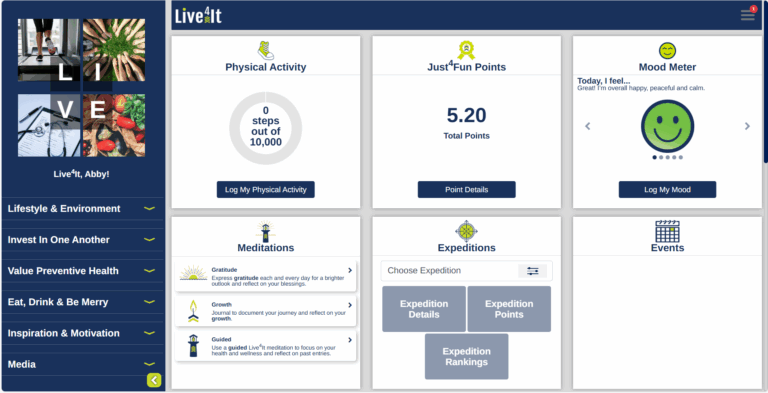
  • Explore the Portal on desktop for full access to resources, challenges, and community.

Because wellness isn’t about doing it all at once—it’s about taking the next step, together.

General Information

Live4It is for everyone*!  It’s intended to help you identify what is important to you; provides opportunities to help you live a longer, healthier life; and then offers easy ways to incorporate those choices into your everyday life.  It doesn’t try to make you someone you’re not:  instead, it takes who you are; what’s important to you; and helps you achieve what you want to accomplish. *18 years or older

If you are 18 years or older, follow the steps at Live4It Homepage How Do I Live4It?”

Scientific studies show longevity can be <30% due to genetic makeup and 70% due to environment and lifestyle.Individual choices, as well as healthy habits, can have a significant impact in your health and longevity. By connecting to a community and encouraging environment, you have access and support to make changes in your health and wellness.

For a variety of reasons, persons under the age of 18 years are not eligible to participate, at this time. If further questions, Please email help@live4it.com.

An Expedition is a program with start and end dates that allow you to earn points and be challenged and motivated to achieve a healthy lifestyle.

Live4It may offer a variety of Expeditions. For specific Expeditions a code may be required. Please check with the sponsoring Organization to see if you qualify to join their Expedition.

Just4Fun Points are earned based on the point value for the various activities within the Live4It mobile and web app and do not have the same rules, requirements, and restrictions as Expedition points. These points are a way you can keep track of your personal Live4It progress (not Expedition specific).

Just4Fun Points are in the Inspiration & Motivation section (see the “Lightbulb” on the bottom ribbon of the app).

Technical Components

Absolutely! Live4It users have access to our mobile app and web portal. These tools help you keep health and wellness top of mind to reach your L-I-V-E goals.

Not a problem! Create an account on the web portal at: live4it.com/Web

We support Fitbit, Garmin, Google Fit and Apple devices. More devices coming soon!

Step 1: First, you must have an active account tied to your Health Data Source.  If not, set up your account with your wearable device following the instructions provided. 

Step 2: Click on the hamburger “3 lines” in the top left-hand corner of the app.

Step 3: Select the appropriate Health Data Source that corresponds to the one you own and with which you have an active account.

Step 4: Follow the instructions provided on the following screen. Note that some wearable devices may require you to sign in with your pre-existing account information.

Step 5: You can always click the hamburger “3 lines” in the top right-hand corner and select Health Data Source to see which device you have in use, if applicable. You can also disconnect or change your connected device from the same settings location. 

You can turn on Face ID and Touch ID within your Account Settings for easier login access.

To change information previously entered when Creating an Account, go to Account Settings under the hamburger in the right hand corner.

Upload your personal pictures to the Customize My “It” section in the mobile app or web portal.

Please keep in mind all data will be calculated based upon EST.

If you are using a wearable device (i.e. Health Data Source) to track your data, you must also sync that device to its Health Data Source app. Live4It pulls data from your Health Data Sources’ database (not directly from your wearable device).

It is important to sync regularly between your Health Data Source and Live4It; especially the last day and first day of each month.

For example, if you have a Fitbit, it must be connected to your Fitbit app and synced regularly; Fitbit must also be chosen as your Health Data Source within Live4It, and you log into Live4It regularly.

1. Confirm that your device is compatible with the Live4It App. If your device is already connected to the App and you are using a wearable device (i.e. Health Data Source) to track your data, you must also sync that device to its Health Data Source App. Live4It does not pull your activity data directly from your wearable device, instead, Live4It pulls data from your Health Data Source’s database. This means, for example, if you have a Fitbit, it must be connected to your Fitbit app and synced regularly. Fitbit must also be chosen as your Health Data Source within Live4It, and you log into Live4It regularly.

2.Give the Live4It App several minutes to sync with your device’s app each time you launch Live4It.

3. Steps reflected may not be identical to your device because Live4It receives multiple back-end feeds that may give you credit for estimated steps (in some cases, in addition to the steps reflected on your device).

Notifications will be posted internally in the Hamburger in the right hand corner.

Hold down the Ctrl+Shift+R buttons to force a hard refresh on the page.

Hear what people are saying?